Showing posts with label ink cartridge. Show all posts

Tuesday, 10 May 2016

Change Printer cartridge Epson WORKFORCE PRO WF-M5190DW

Home >> Help >> Change printer toner Epson WORKFORCE PRO WF-M5190DW


Replacing the printer cartridge Epson WF-M5190DW

Change Cartridge Epson


If you have a printer of this brand and we have never run out of ink, it is normal to ask ourselves how to put an Epson printer ink, usually in inkjet printers Expression Home is usually quite simple. And replace the ink cartridges in the printer WorkForce M5190 is also very simple, as long as you follow these steps.
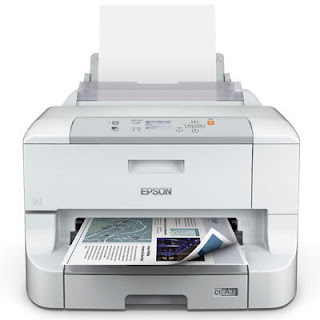

Epson WF-M5190DW

Open the front cover, it ie the center of the printer just below the block of the LCD.
slightly push the ink cartridge you want to replace, it will move just out. Once you get this, remove the ink cartridge.
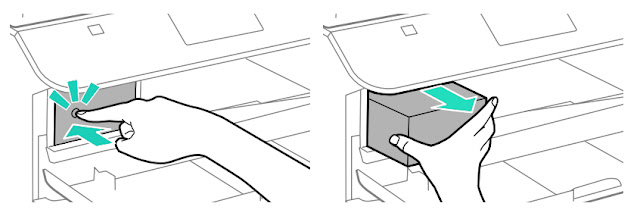
Change the cartridge Epson WF-M5190DW

Enter the old ink cartridge in a bag or the like, remove the new cartridge packaging but be very careful when removing the wrapper from the new ink cartridge when handling the new cartridge, do not touch the two sensitive devices the following image.
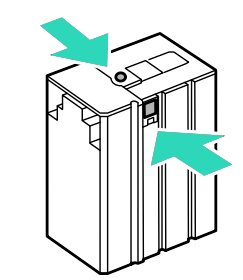
Change the cartridge Epson WF-M5190DW
Shake the cartridge to avoid at any time by a bad product stored ink is less dissolved by any of the inner ends of the ink cartridge.
Insert the ink cartridge into the printer, and when you hear the click of the printer will indicate on the LCD display something like ... "CHECK PRINT. Cart." Then click ok.
Close the front cover you opened in step 1. And print! :-)


How to know the ink level  of Epson WF-M5190DW


If you want to know what level of ink cartridges Epson they have the need to open the "Control Panel" printer. There will access the "Menu" and then choose "Ink level". We know both the level of ink cartridges as the remaining space in the box printer maintenance. The box printer maintenance is another of the "consumables" that must be changed at some point in the life of the printer.

Read the original post at Cambiar cartucho impresora Epson WORKFORCE PRO WF-M5190DW

Thursday, 5 May 2016

WHY CHOOSE: tricolor cartridge vs. three cartridges

Home >> FAQ >> WHY CHOOSE: tricolor cartridge vs. three cartridges

Printers with 3 single tri-color cartridge or cartridges

ink cartridges


¿Tricolor ink cartridges or three cartridges?


Tricolor ink cartridges or three loose ink cartridges, the great dilemma. Besides recommend you to read our guide recommendations to keep in mind when buying a new printer, we need to see the own tricolor ink cartridges and loose the three cartridges of each color ink characteristics.


Type ink cartridges and components


On the one hand we must know that in most cases, the tri-color cartridges include the print head, which, in theory you should save on the one hand, you lose when you buy a more expensive product. But of course ... the printers with tri-color cartridge, tend to be cheaper, because, just lack printhead and this among many other things, can lower the cost price of the printer.

How the colors are achieved?

You should know that to get a color print, the mixture of four colors of the four main colors, ie, black, cyan, magenta and yellow is performed. So, having individual cartridges, you probably get optimize performance and utilization of all colors with which mixtures are made. I give you an example that describes this graphically.


ink colors


Create the orange through or CMYK four-color (acronym for the four main colors mentioned above), it requires:

  • 0% cyan
  • 50% magenta
  • 100% yellow
  • 0% black


With this example easily we demonstrate that it is dangerous to buy a printer of this type if the logo of your company or project is orange, because large amount of cyan will remain unused before you have to change the ink cartridge from your printer.

If you're going to make a household printer, if we recommend this type of printer, because ... really for the low cost and print have sporadically or even things in black, it makes sense to use these printers. If this is not the case and you decant for an inkjet printer ink is more advisable although it has a higher cost of implementation (more expensive printer), you do do with a printer ink cartridges with independent colors, ie three cartridges.


Look at the original post in Consejos Impresoras