Showing posts with label Canon. Show all posts

Tuesday, 10 May 2016

Change Printer cartridges Canon MG-2555

Home >> Help >> Change Printer cartridges Canon MG-2555

Canon printer MG-2555


Change Printer cartridges Canon MG-2555


All printers usually come with a manual or user guide where are the instructions to change printer cartridges. In the series of Canon MG-2500 you have left at the end of the post the link of all the manuals available so you can download without problems.

Canon MG-2555

You have to change the cartridges when the alarm light blinks orange (error) and the ink lamps at a time.The steps then we will serve you to replace virtually all of Canon's FINE cartridges (two cartridges: one black and one tricolor) type.

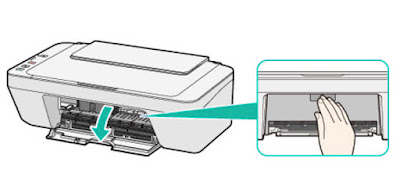
We check that the printer is turned on and connected to the computer.If the paper tray is extended below the close.We open the front cover. To do this we need to pull us and down, as shown in the image below. We'll see how the "car" of the cartridges moves to the center so that we can easily change them.

Cambiar cartuchos impresora Canon MG-2555

  • Remove the cartridge "car." To do this, simply press the end of the cartridge down until it clicks. Do not force or squeeze too, so if you see that it costs a lot of work, maybe you're not doing well.
  • Get the whole cartridge and take the new cartridge. Remember to remove all seals before installing it, because if not, the cartridge will give you problems and will not work perfectly. The seal is usually in the head cartridge.
  • Insert the new cartridge. Make the same movement as when you extracted the other, but in reverse. To lock the cartridge has to make a click.


Cambiar cartuchos impresora Canon MG-2555

Close the front cover. The printer must be ready to print. If the light "alarm" lights orange after installing it ... .you have not done something well: -S. Do not worry and try to do it again.


Check out the original content at Cambiar cartuchos impresora Canon MG-2555

How to change cartridges Canon MX-410 printer

Home >> Help >> How to change cartridges Canon MX-410 printer

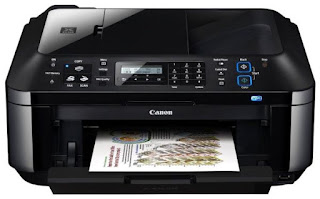
Canon printer MX-410

Change printer cartridges Canon MX-410


Printers usually come with a user guide where you can see the steps to change ink cartridges if you do not have or have lost, you can follow the instructions listed below you.


Canon MX-410


*Change your printer cartridge when prompted only the printer itself. No need to change the two cartridges at a time, only to be depleted.

  • With the printer connected to the computer and the power, check that is on.
  • Open the paper output tray.
  • Lift the top cover (where the scanner is) to access the cartridges.
  • Extracts the cartridges as shown in the image. First you have to lift the cover that holds the cartridge and then pull it out.
  • Change printer cartridges Canon MX
  • Take the new cartridge and remove all bearing seals.
  • Install it in the corresponding hole and as such was the other cartridge and close the cartridge cover until it clicks. * It is important that the cover is properly closed and straight to fit.
  • To close the scanner cover you have to lift slightly this and close smoothly.


If you want more information about Canon MX-410 printer can take a look at our review.


These steps to change cartridges Canon MX-410, also serves the following models of Canon printers:

Canon MX-395, Canon MX-475, MX-525 Canon, Canon MX-535, MX-725 Canon Canon Canon MX-895 and MX-925.


Thursday, 5 May 2016

Canon MX410 printer cartridges

Home >> Help >> Cartuchos impresora Canon MX-410

Canon Pixma Ink Cartridges MX-410


Canon ink


The Canon MX-410 printer is a inkjet printer, this means that consumables are using ink cartridges. This particular printer uses two ink cartridges, one black and one tricolor FINE type.

Canon FINE cartridges are a type of cartridges, and contain the ink, have built the print head, so that when you change the cartridge, you also change the printhead. These cartridges are both standard version of 9ml, as XL version for those who print more quantity, with 15 and 13ml.


Canon ink cartridges Standard

Name: Cartridge Canon PG-510
Canon cartridge PG-510

Name: Canon CL-511 Cartridge
Canon CL-511 Cartridge

OEM Reference:2970B001
OEM Reference: 2972B001

Ml: 9 ml
Ml: 9 ml

Colour


Colour


Canon XL ink cartridges


Name: Cartridge Canon PG-512
Canon cartridge PG-512


Name: Canon CL-513 Cartridge
Canon CL-513 Cartridge

OEM Reference: 2969B001
OEM Reference: 2971B001

Ml: 15 ml
Ml: 13 ml

Colour


Colour


Canon Savings Packs


Name: Canon Pack PG510 and CL511
Canon Pack ahorro PG510 y CL511


OEM Reference: 2970B010


Ml: 2 x 9 ml


Colour


These Canon Pixma printer cartridges are also valid for the following printers:
Canon Pixma iP 2700, Canon Pixma iP 2702, Canon Pixma MP 230, Canon Pixma MP 235, Canon Pixma MP 240, Canon Pixma MP 250, Canon Pixma MP 252, Canon Pixma MP 260, Canon Pixma MP 270, Canon Pixma MP 272, Canon Pixma MP 280, Canon Pixma MP 282, Canon Pixma MP 480, Canon Pixma MP 490, Canon Pixma MP 492, Canon Pixma MP 495, Canon Pixma MP 499, Canon Pixma MX 320, Canon Pixma MX 330, Canon Pixma MX 340, Canon Pixma MX 350 and MX 360 Canon Pixma.


Look at the original post in Consejos Impresoras

Canon Pixma MX410 printer (review)

Home >> Buy Printer >> Buy Printer Printer Canon Pixma MX-410 (review)


Canon Pixma MX-410

Canon Pixma MX-410

Canon Pixma MX-410
Nota impresora

Impresión desde el móvil

Impresiones mensuales

Impresora a color


Tipo: Multifunction ink
Precio medio: ~100€


Canon cartridges MX-410

Description and printer features Canon Pixma MX410

This multifunction printer is a printer that can be used for both home and for an office because it is a convenient printer that lets you print, scan, copy and fax from any computer thanks to WiFi connectivity. That is, any computer that is connected to the same network can access the printer to send documents to print or scan your own computer.


The Canon MX-410 printer uses two cartridges Canon FINE type, one black and one tricolor. These cartridges are available in standard version, containing 9 ml each cartridge; and XL, which already has 15 ml black and 13 ml color.

The Canon brand has its PIXMA line of printers that usually, usually, printers all "all in one" but still reasonable for most consumers can have either a printer for home or office price. These printers also carry software to print photos more creatively called "My Image Garden". This program allows you to easily sort your photos, including templates, video creator, etc.

Key Features Canon MX-410 printer

  • Multifunction System: Copy, scan and print
  • Connections / Interface: USB, WIFI and Bluetooth Ver 2.0.
  • Print Method: Thermal System or Bubble Jet
  • LC display: If (black and white)
  • Print resolution: 4,800 x 1,200 dpi
  • Print speed: 8.7 ppb (mono) and 5.0 ppb (color)
The Canon Pixma MX-410 multifunction printer is a versatile machine and can be used for both domestic impressions to an office. Speed, although not very high, falls within the average desktop inkjet printers, which is usually between 10 and 30 ppb. This printer, in particular, reaches nearly 10 ppb in black and white and 5.7 pages per minute in color, which really is not bad for a small office where documents sporadically but are printed daily. The maximum print resolution is 4,800 x 1,200 dpi, which is usually the standard Canon Pixma range.

Connectivity Canon MX-410 printer via both USB and WIFI, whatever we more comfortable. The nice thing about having WIFI is that any computer or device that is connected to the network can use the printer.

Canon MX-410 connection
In addition, Canon has an application called PIXMA Printing Solutions with which you can both print and scan from your Smartphone or tablet. This application can download us from the "Play Store" of the device called "PRINT Canon Inkjet / SELPHY" which already has a million downloads. From the app you can also see the ink levels, and download manuals and user guides. It is also compatible with Google Cloud Print and Apple AirPrint.


The printer has a scanner 21.6 x 29.7 cm with a maximum resolution of 1,200 x 2,400 dpi. A4 documents scanned in approximately 14 seconds and can do both color and black and white. The scanner Canon MX-410 allows you to scan JPEG, compact PDF or normal memory directly to the USB or computer. Program includes OCR text recognition.


The Canon MX-410 is a printer with fax, you can use it from your computer or from the printer itself. It allows you to send fax in color and black and white with a resolution up to 300 x 300 dpi. 
Fax Canon MX-410
The printer can save documents directly to the USB Flash memory that connect you. It allows redial, connect the answering machine, coded speed dials and group, among other things.


It supports multiple media types, both normal and photographic, labels and even paper "transfer" used for prints on shirts. It also has a customizable paper tray to print the following sizes:
  • A4
  • B5
  • TO 5
  • Letter
  • Legal
  • envelopes DL
  • about COM10
  • 10x15cm
  • 13x18cm
  • 20x25cm


The paper input tray of the Canon printer is a maximum of 100 sheets and can print on plain paper up to a weight of 300 g / m². In addition, this printer is very comfortable for double-sided printing as it has the option of automatic duplex so you do not have to do it manually.


The operating systems supported by the Canon MX-410 printer are as follows: Windows XP SP ", SP3, Windows Vista, Windows 7 and Mac OS X v.10.4.11 - 10.6.


Canon Pixma MX-410
What's in the Canon MX-410 printer?

  • 2 separate ink cartridges
  • Printer
  • Power cord
  • Manual
  • Printer Software


Additional information printer Canon Pixma MX-410:


Look at the original post in Consejos Impresoras

Canon paper for printing photos

Home >> Photography >> Canon paper for printing photos


Photo paper compatible with Canon Pixma printers

We have selected the Canon Pixma printers ideal for photo papers. These roles are geared for domestic printing photographs, with good quality and affordable appreciations for the final consumer.


Canon Everyday Use Glossy GP-501

Paper type
Features
Nº sheets
Gloss
A4 - 210 g/m²
A4 – 170 g/m²
10x15 cm – 210 g/m²

100
100
100
Canon Everyday Use Glossy GP-501

Ref. OEM: GP-501


Canon Plus Glossy II PP-201


Paper type
Features
Nº sheets
++Gloss and high quality
A3 – 260 g/m²
A4 - 275 g/m²
10x15 cm – 260 g/m²
13X18 cm – 260 g/m²
20
20
50
20
Canon Plus Glossy II PP-201


Ref. OEM: PP-201


Canon Plus Semi-gloss SG-201


Paper type
Features
Nº sheets
Satin
A3 - 260 g/m²
A3+ - 260 g/m²
A4 – 260 g/m²
10x15 cm – 260 g/m²
20x25 cm - 260 g/m²
20
20
20
50
20
Canon Plus Semi-gloss SG-201


Ref. OEM: SG-201


Canon Matte Photo Paper MP-201


Paper type
Features
Nº sheets
Matte
A3 – 170 g/m²
A4 – 170 g/m²
40
50
Canon Matte Photo Paper MP-201


Ref. OEM: MP-101

Look at the original post in Consejos Impresoras