Showing posts with label Canon Pixma MX. Show all posts

Tuesday, 10 May 2016

How to change cartridges Canon MX-410 printer

Home >> Help >> How to change cartridges Canon MX-410 printer

Canon printer MX-410

Change printer cartridges Canon MX-410


Printers usually come with a user guide where you can see the steps to change ink cartridges if you do not have or have lost, you can follow the instructions listed below you.
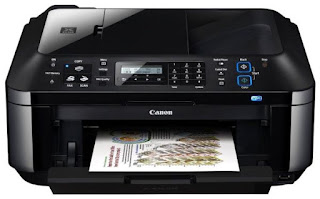

Canon MX-410


*Change your printer cartridge when prompted only the printer itself. No need to change the two cartridges at a time, only to be depleted.

  • With the printer connected to the computer and the power, check that is on.
  • Open the paper output tray.
  • Lift the top cover (where the scanner is) to access the cartridges.
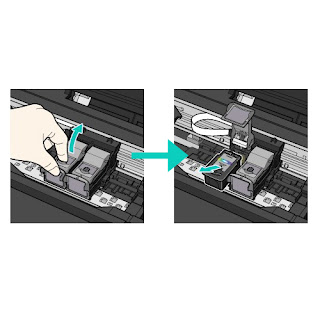
  • Extracts the cartridges as shown in the image. First you have to lift the cover that holds the cartridge and then pull it out.
  • Change printer cartridges Canon MX
  • Take the new cartridge and remove all bearing seals.
  • Install it in the corresponding hole and as such was the other cartridge and close the cartridge cover until it clicks. * It is important that the cover is properly closed and straight to fit.
  • To close the scanner cover you have to lift slightly this and close smoothly.


If you want more information about Canon MX-410 printer can take a look at our review.


These steps to change cartridges Canon MX-410, also serves the following models of Canon printers:

Canon MX-395, Canon MX-475, MX-525 Canon, Canon MX-535, MX-725 Canon Canon Canon MX-895 and MX-925.


Thursday, 5 May 2016

Canon MX410 printer cartridges

Home >> Help >> Cartuchos impresora Canon MX-410

Canon Pixma Ink Cartridges MX-410


Canon ink


The Canon MX-410 printer is a inkjet printer, this means that consumables are using ink cartridges. This particular printer uses two ink cartridges, one black and one tricolor FINE type.

Canon FINE cartridges are a type of cartridges, and contain the ink, have built the print head, so that when you change the cartridge, you also change the printhead. These cartridges are both standard version of 9ml, as XL version for those who print more quantity, with 15 and 13ml.


Canon ink cartridges Standard

Name: Cartridge Canon PG-510
Canon cartridge PG-510

Name: Canon CL-511 Cartridge
Canon CL-511 Cartridge

OEM Reference:2970B001
OEM Reference: 2972B001

Ml: 9 ml
Ml: 9 ml

Colour


Colour


Canon XL ink cartridges


Name: Cartridge Canon PG-512
Canon cartridge PG-512


Name: Canon CL-513 Cartridge
Canon CL-513 Cartridge

OEM Reference: 2969B001
OEM Reference: 2971B001

Ml: 15 ml
Ml: 13 ml

Colour


Colour


Canon Savings Packs


Name: Canon Pack PG510 and CL511
Canon Pack ahorro PG510 y CL511


OEM Reference: 2970B010


Ml: 2 x 9 ml


Colour


These Canon Pixma printer cartridges are also valid for the following printers:
Canon Pixma iP 2700, Canon Pixma iP 2702, Canon Pixma MP 230, Canon Pixma MP 235, Canon Pixma MP 240, Canon Pixma MP 250, Canon Pixma MP 252, Canon Pixma MP 260, Canon Pixma MP 270, Canon Pixma MP 272, Canon Pixma MP 280, Canon Pixma MP 282, Canon Pixma MP 480, Canon Pixma MP 490, Canon Pixma MP 492, Canon Pixma MP 495, Canon Pixma MP 499, Canon Pixma MX 320, Canon Pixma MX 330, Canon Pixma MX 340, Canon Pixma MX 350 and MX 360 Canon Pixma.


Look at the original post in Consejos Impresoras

Wednesday, 27 April 2016

How to change the Canon MX410 printer cartridges

Home >> Help >> How to change the Canon MX410 printer cartridges

Canon printer MX-410

Change printer cartridges Canon MX-410

Printers usually come with a user guide where you can see the steps to change ink cartridges if you do not have or have lost, you can follow the instructions listed below you.

Canon MX-410
* Change your printer cartridge when prompted only the printer itself. No need to change the two cartridges at a time, only to be depleted.

  • With the printer connected to the computer and the power, check that is on.
  • Open the paper output tray.
  • Lift the top cover (where the scanner is) to access the cartridges.
  • Extracts the cartridges as shown in the image. First you have to lift the cover that holds the cartridge and then pull it out.
Change printer cartridges Canon MX


  • Take the new cartridge and remove all bearing seals.
  • Install it in the corresponding hole and as such was the other cartridge and close the cartridge cover until it clicks. * It is important that the cover is properly closed and straight to fit.
  • To close the scanner cover you have to lift slightly this and close smoothly.

If you want more information about Canon MX-410 printer can take a look at our review.

These steps to change cartridges Canon MX-410, also serves the following models of Canon printers:
Canon MX-395, Canon MX-475, MX-525 Canon, Canon MX-535, MX-725 Canon Canon Canon MX-895 and MX-925.


Look at the original post in Consejos Impresoras