Showing posts with label printers. Show all posts

Tuesday, 10 May 2016

Printers that spend low ink

Home >> Buy printer >> Printers that spend low ink

Did you buy that printer was on offer for 30 €? Have you then regretted to see that the cartridges are worth more than the printer itself? Probably who answered yes to the first question ... .also made it to the second.
Printers who spend little
Impresoras que gasten poco

If we remember the saying "cheap is expensive" with printers corresponds to 100%. You can usually find a printer inkjet for 40 €, however, when buying cartridges, you will realize that these are quite expensive.

Generally, the inkjet printers typically spend more than the laser. The problem with the latter is that they usually cost more than € 100, so in the first instance, we can be expensive.

If what you're looking for is that the cost per copy as small as possible, we do recommend a mono laser printer (ie, that only print in black and white). The only thing is to renounce the colored end, but always can go to a reprographic printing in color, in the end, will be cheaper to print it at home with an inkjet printer.

As for models ... There are no specific models that use less than normal, but we recommend that are printers that can be configured the way it is printed. For example, in some Brother printers, you can activate the "toner saving mode". Thus, what it does is clarify a bit the tone of the prints, so you can see perfectly, but when printing, less toner is used.


Another way to get the most for print save is to buy economical ink. Currently there are many shops where you can buy supplies at a great price.

You can see the original post at Impresoras que gasten poco

Thursday, 5 May 2016

Brother HL-3140 laser printer Color

Home >> Buy Printer >> Brother HL-3140 Laser Printer Color


Brother HL-3140 laser printer Color


Brother HL-3140


Brother HL-3140


 Brother HL-3140


Description and features laser printer Brother HL-3140


This color laser printer is perfect for printing our color documents at a low cost and high quality. It is reduced in size so you can easily install it wherever you want, because you can use it as a desktop printer.


The Brother laser printers have always enjoyed being quality printers, durable and give few problems over time. Brother printers usually offer very good price, affordable to most consumers, like consumables that are not usually the most expensive. This printer uses individual toners and drums (although the latter are sold in one pack). This ensures optimum print quality because the color toner powder is transferred avoiding color mixtures.


Brother HL-3140


With this printer you can reduce costs and save space. It is designed for a small or medium office who need to print quality color documents.


Key Features Brother HL-3140:

  • Equipment Multifunction not: Just print
  • Connection / Interface: USB and Wifi Direct
  • Printing Method: Color Laser Printing
  • LC Display: Yes
  • Print resolution: 2400 x 600 dpi
  • Print speed: 18 ppb


The Brother HL-3140 printer is a printer designed for office use thanks to its high printing speed even color, because it is capable of printing 18 pages per minute in both black and white and full color. It is ready to print leaflets on quality paper with its print resolution of 2400 x 600 dpi, which for a laser printer, is pretty good. In addition, as mentioned, it is a comfortable printer with not much space and can install it on the table without problems.

This printer has the option to connect via USB directly to your computer or via WIFI. If you connect through the wireless network from any computer or device that is connected to the same network you can print directly to the printer. And thanks to its technology, is compatible with Apple AirPrint and Google Cloud Print so you can print directly from your Smartphone or tablet.

If you decide to connect the printer via USB, remember that printers do not usually include the cable so if you do not know very well that cable uses, you better take a look at this post.

The Brother HL-3140 duplex prints manually, so if you want to print in this way, we have to do first printing the odd pages and then the even.

Paper types supported by the Brother printer are enough, because it has a manual feed a sheet adapts to different sizes and paper supports:

  • A4
  • TO 5
  • A6
  • Letter
  • Legal
  • Envelopes
  • B5
  • Executive


Brother HL-3140In addition, this printer lets you print on plain paper, recycled, glossy paper, labels or envelopes.

The paper tray has a capacity of 250 sheets so will allow you to print large documents without having to be aware of the paper. Keep in mind that this printer is recommended for a monthly duty cycle of 1,500 pages.

The Brother HL-3140 is compatible with the following operating systems: Windows 7, Windows 8, Widows Server 2003 and 2008, Windows Vista and Windows XP.


What's in the Brother HL-3140 printer?

    Brother HL-3140
  • 4 toner cartridges
  • Brother HL-3140
  • 1 unit drum
  • Drive belt
  • Waste toner collector
  • Printer
  • Power cord
  • Software and drivers
  • User's Guide
  • Quick Setup Guide


Look at the original post in Consejos Impresoras

Canon Pixma MX410 printer (review)

Home >> Buy Printer >> Buy Printer Printer Canon Pixma MX-410 (review)


Canon Pixma MX-410

Canon Pixma MX-410

Canon Pixma MX-410
Nota impresora

Impresión desde el móvil

Impresiones mensuales

Impresora a color


Tipo: Multifunction ink
Precio medio: ~100€


Canon cartridges MX-410

Description and printer features Canon Pixma MX410

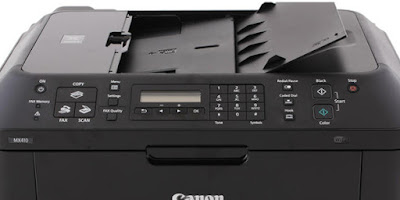
This multifunction printer is a printer that can be used for both home and for an office because it is a convenient printer that lets you print, scan, copy and fax from any computer thanks to WiFi connectivity. That is, any computer that is connected to the same network can access the printer to send documents to print or scan your own computer.


The Canon MX-410 printer uses two cartridges Canon FINE type, one black and one tricolor. These cartridges are available in standard version, containing 9 ml each cartridge; and XL, which already has 15 ml black and 13 ml color.

The Canon brand has its PIXMA line of printers that usually, usually, printers all "all in one" but still reasonable for most consumers can have either a printer for home or office price. These printers also carry software to print photos more creatively called "My Image Garden". This program allows you to easily sort your photos, including templates, video creator, etc.

Key Features Canon MX-410 printer

  • Multifunction System: Copy, scan and print
  • Connections / Interface: USB, WIFI and Bluetooth Ver 2.0.
  • Print Method: Thermal System or Bubble Jet
  • LC display: If (black and white)
  • Print resolution: 4,800 x 1,200 dpi
  • Print speed: 8.7 ppb (mono) and 5.0 ppb (color)
The Canon Pixma MX-410 multifunction printer is a versatile machine and can be used for both domestic impressions to an office. Speed, although not very high, falls within the average desktop inkjet printers, which is usually between 10 and 30 ppb. This printer, in particular, reaches nearly 10 ppb in black and white and 5.7 pages per minute in color, which really is not bad for a small office where documents sporadically but are printed daily. The maximum print resolution is 4,800 x 1,200 dpi, which is usually the standard Canon Pixma range.

Connectivity Canon MX-410 printer via both USB and WIFI, whatever we more comfortable. The nice thing about having WIFI is that any computer or device that is connected to the network can use the printer.

Canon MX-410 connection
In addition, Canon has an application called PIXMA Printing Solutions with which you can both print and scan from your Smartphone or tablet. This application can download us from the "Play Store" of the device called "PRINT Canon Inkjet / SELPHY" which already has a million downloads. From the app you can also see the ink levels, and download manuals and user guides. It is also compatible with Google Cloud Print and Apple AirPrint.


The printer has a scanner 21.6 x 29.7 cm with a maximum resolution of 1,200 x 2,400 dpi. A4 documents scanned in approximately 14 seconds and can do both color and black and white. The scanner Canon MX-410 allows you to scan JPEG, compact PDF or normal memory directly to the USB or computer. Program includes OCR text recognition.


The Canon MX-410 is a printer with fax, you can use it from your computer or from the printer itself. It allows you to send fax in color and black and white with a resolution up to 300 x 300 dpi. 
Fax Canon MX-410
The printer can save documents directly to the USB Flash memory that connect you. It allows redial, connect the answering machine, coded speed dials and group, among other things.


It supports multiple media types, both normal and photographic, labels and even paper "transfer" used for prints on shirts. It also has a customizable paper tray to print the following sizes:
  • A4
  • B5
  • TO 5
  • Letter
  • Legal
  • envelopes DL
  • about COM10
  • 10x15cm
  • 13x18cm
  • 20x25cm


The paper input tray of the Canon printer is a maximum of 100 sheets and can print on plain paper up to a weight of 300 g / m². In addition, this printer is very comfortable for double-sided printing as it has the option of automatic duplex so you do not have to do it manually.


The operating systems supported by the Canon MX-410 printer are as follows: Windows XP SP ", SP3, Windows Vista, Windows 7 and Mac OS X v.10.4.11 - 10.6.


Canon Pixma MX-410
What's in the Canon MX-410 printer?

  • 2 separate ink cartridges
  • Printer
  • Power cord
  • Manual
  • Printer Software


Additional information printer Canon Pixma MX-410:


Look at the original post in Consejos Impresoras

How to print in black and white

Home >> Save >> How to print in black and white

How to print in black and white with color printers


Monochrome printing with HP, Brother, Epson, Canon and Samsung printers.

Print in monochrome


We often want to print documents that really are not very important or we can do without color. To do this with a print in grayscale or black and white will suffice us and also we save ink. You can configure the print in black and white is quite similar in the different brands of printers.

Take the example that we have a Word document and want to print in black and white.

To send print the document press the following keys on your keyboard "Ctrl + P" or "Ctrl. + P".

We will open a small window with the specifications for printing. There press "Properties". In the properties, depending on the printers we find some options or other.

For example, Samsung laser printers have to go to the tab "Design" and then on "Color Mode" Select "Grayscale".

In inkjet printers HP Deskjet can normally set from the printer program itself, "Advanced", then select Print in "Grayscale" and lowering the drop-down menu click on "Black Ink Only".

With the Canon inkjet printers, for example the series of the Canon Pixma MG, we can open the printer driver and on the tab that says "Main" select "Grayscale".

If we have a Brother printer, such as a Brother MFC-J430W, when we give to print and then we click on "Preferences" We will open another dialog with the printer properties: quality, size, orientation ... There we see that we can choose "Grayscale" and even print in "ink saving mode".

What we got printed in black and white?


Save printing in black and white
Mainly, what we want is not to waste color ink when it is not really necessary. If it is true that some printer models pull some ink cartridges to print color or grayscale black and white but obviously not as much as if imprimieses full color.

You may also wish that effect on some documents and want to choose this option. Our recommendation is that, if not absolutely necessary, imprimáis in black and white in "draft mode" because eventually you will notice a big savings in ink!


Look at the original post in Consejos Impresoras