Home >> Save >> Ink saving tips
Save on printer ink
How to save on prints using less ink
We leave you some tips that will help you save on your impressions of both ink and toner.

1. Print in draft mode: This mode is available on some printer models in the brand Brother for example there is an option of "Toner Save". Through the Office document, print when you select the printer properties. There you can activate toner saving draft or what it will do is print a little lighter than normal, but still legible form.
2. Print pages written on one side: Exactly! How many papers used on one side and then we throw away? We can reuse them for documents to be submitted not anyone.
3. Leverage duplexing: Many printers have automatic duplexing print that makes work easier because you just have to select the option and the printer does the rest.
4. Turn off automatic mode: Especially in companies, turn on the printer first thing ... and can stay on for days. This increases the power consumption of the printer and can shorten its life, so ... or are pending or better activate the sleep mode.
5. Print color only when needed: If calculásemos the difference in cost per page of the same document in color and black and white ... we would be surprised. If not essential, best monochrome.
6. Control Programs: Some Softwares of all printers allow you to print so as to save on ink or toner. These programs automatically removed images, the big titles or less important data (headers / footers ...)
7. XL Consumables: Almost all brands have cartridges with XL versions whose cost per ml is lower than normal.
8. Take care of the printer and clean it: The printers need regular maintenance, it is best to check with the printer manual and follow cleaning. A printer can consume you messed up more ink than one that is good.
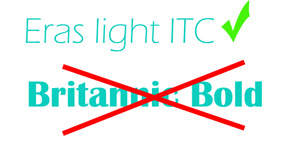
9. Typeface: do not you think so? Bolding are the worst enemy of savings! But not only that, the font also influences. A light Eras ITC does not use the same amount of ink a Britannic Bold. Also shaded, they underlined and additional others, can vary your ink consumption significantly.
10. The printer spends more if printed sporadically: On some models can reach 503% increase ink consumption when printing from time to time if done intensively.
11. Dries if the printer is not in use: In inkjet printers must be very careful if we abandoned for a time ... cartridges have a head where the ink comes out. If it ceases to be used, the ink that soaks the head is dry, so, or we got back we print head cleaning or doing we must pull the cartridge :-(. In the case of toners, often for lack of use toner powder caked on the inside remains. it is common to have to remove it, shake slightly to distribute the toner well and put it back into the printer.
12. Type of paper: there are different sizes, thicknesses, quality ... If we can better recycled paper, and if it has to be new role, we can opt for any of average quality.
Look at the original post in Consejos Impresoras